
Email Marketing Software for Small Businesses: What to Compare Before You Pay

Choosing email marketing software looks simple until you compare three plans that all promise "automation" and "AI" at different prices. The bigger change since 2024 is not features but rules: Google's email sender guidelines now require authentication and one-click unsubscribe from anyone sending 5,000 or more messages a day to Gmail accounts, and other inbox providers have followed. This guide gives small businesses in India and the UAE a scored checklist covering deliverability, automation, AI, pricing by list size and CRM sync. If you want a second opinion on your own setup, you can speak with the Leadmetrics team before you commit to a plan.
Key Takeaways
- Deliverability is the first filter. A tool that cannot help you pass SPF, DKIM and DMARC checks is not worth comparing on features.
- Four automated sequences cover most of what a small business needs in year one. Buy for those, not for a long feature list.
- Pricing changes shape between 1,000 and 25,000 contacts, so ask every vendor for quotes at all three sizes in INR or AED.
Do you need email marketing software or a managed email marketing service?
Software gives you the tool: templates, lists, automation and reports. You or your team write the emails, build the segments and watch the numbers. A managed email marketing service adds people who plan the calendar, write the copy, set up the sequences and report back. The first costs less in fees and more in your time.
For most small businesses the honest test is who will do the work every week. If nobody on the team can give email a few hours a week, a cheaper tool will sit unused. If you have a marketer who enjoys the work, paying for a managed service duplicates effort.
There is also a middle option. Platforms such as Leadmetrics email marketing use an AI agent to create campaigns, segment audiences, personalise copy and trigger follow-ups, with human review before anything is sent. That suits teams who want automation without handing the whole channel to an outside agency.
| Option | Who does the work | Best for |
|---|---|---|
| Software only | Your team | Businesses with an in-house marketer |
| Managed service | The provider | Owners with no time for email |
| AI platform with review | AI drafts, people approve | Small teams who want output without a full-time hire |
Which deliverability basics must every buyer check?
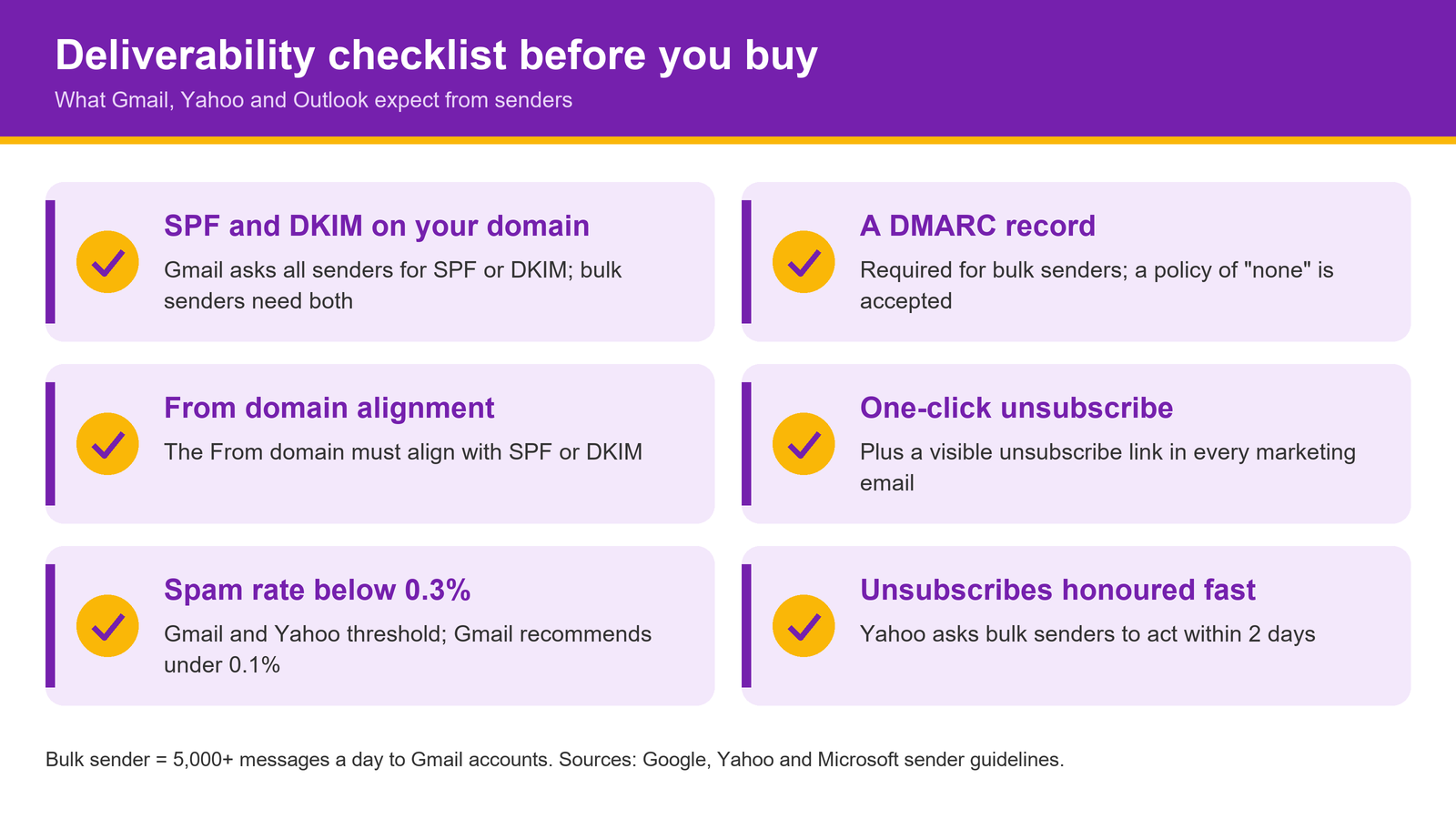
Gmail's rules are the clearest benchmark. For all senders, Google asks for SPF or DKIM on the sending domain and a spam rate below 0.3% in Postmaster Tools. For senders of 5,000 or more messages a day to Gmail, it requires both SPF and DKIM, a DMARC record (a policy of "none" is accepted), alignment between the From domain and SPF or DKIM, and one-click unsubscribe for marketing messages. Google recommends keeping the spam rate under 0.1%.
Yahoo's sender best practices for bulk senders line up closely: SPF and DKIM, a DMARC policy of at least "p=none", one-click unsubscribe, unsubscribes honoured within 2 days and a spam rate below 0.3%. Microsoft announced similar requirements for Outlook for domains sending more than 5,000 emails a day, including mandatory SPF, DKIM and DMARC.
What this means for a buyer is practical. Ask each vendor:
- Can I send from my own domain with DKIM signing, and will you guide me through the DNS records?
- Does every marketing email carry a one-click unsubscribe header as well as a visible link?
- Where can I see bounce, complaint and unsubscribe rates per campaign?
- Is the sending IP shared or dedicated, and who decides?
If a sales team cannot answer these clearly, move on. A great template editor does not help if your emails land in spam.
Which 4 automated sequences does a small business need first?
Most email marketing automation tools can run dozens of workflows. In practice, four sequences carry most of the value for a small business, and they are worth setting up before any newsletter.
- Welcome sequence. Two or three emails after someone subscribes or enquires: who you are, what to expect, one useful resource and a simple next step.
- Enquiry follow-up. For leads who asked about a service and did not book. Answer the main objection, share proof you can stand behind and make one clear ask.
- Post-purchase or post-visit. A thank-you, care or usage tips and a request for a Google review once the customer is happy.
- Re-engagement. For contacts who have not opened or bought in a set period. Ask if they still want to hear from you, and remove those who do not respond to protect your sender reputation.
The enquiry follow-up is usually where revenue is won or lost. Our guide to automated nurture sequences covers timing and content for that sequence in more detail. When you test tools, build this one sequence in each trial and compare how long it takes.
Where do AI features help, and where are they noise?
Every vendor now calls itself AI email marketing software, so judge the feature, not the label. AI helps most with first drafts, subject line variants, segment suggestions and summarising what worked last month. It saves time on tasks that are repetitive but still need judgement.
It adds less when it replaces decisions you should own: what you offer, what you promise and who you email. An AI that writes "limited time only" on an evergreen offer, or invents a statistic, creates work rather than saving it. Look for tools that keep a human approval step and let you edit before sending.
| Useful AI features | Often noise |
|---|---|
| Draft copy from a short brief | "AI-powered" templates that are just layouts |
| Subject line and preview text variants | Scores with no explanation of how they are calculated |
| Segment suggestions based on activity | Auto-sending without review |
| Plain-language performance summaries | Predictions with no data history behind them |
If you want AI-written email copy that still goes through expert review, check how the drafting and approval steps fit together. Better inputs also produce better drafts, and our prompt templates for email and nurture copy are a good place to start.
How does pricing change at 1k, 5k and 25k contacts?
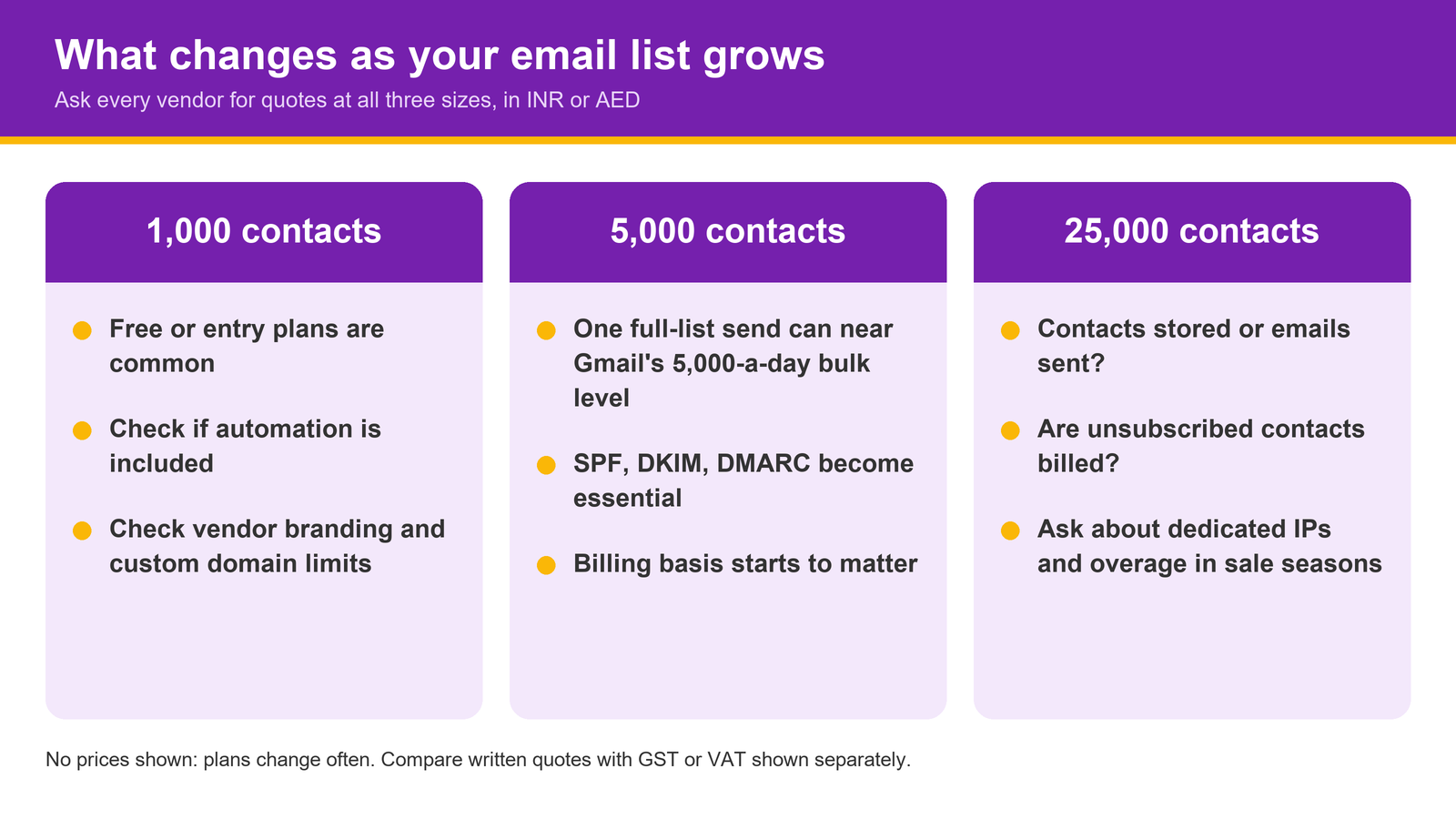
We are not quoting prices here, because plans change often and many vendors price in USD with different limits. What matters more is how the pricing model behaves as your list grows, so ask every shortlisted vendor for a written quote at 1,000, 5,000 and 25,000 contacts, in INR for India or AED for the UAE, with tax shown separately.
At around 1,000 contacts, many tools offer free or entry plans. Check what is missing: automation, removal of the vendor's branding, custom domain sending and support are common limits. At around 5,000 contacts, one full-list send to a mostly Gmail audience can approach the 5,000-messages-a-day level where Gmail's stricter rules apply, so authentication and unsubscribe handling become essential, not optional.
At around 25,000 contacts, the questions change. Is pricing based on contacts stored or emails sent? Are unsubscribed contacts still billed? Do you need a dedicated IP, and who warms it up? Is there an overage charge if you go over your plan in a festive season sale?
| Question | 1k contacts | 5k contacts | 25k contacts |
|---|---|---|---|
| Is automation included? | Often limited | Usually | Yes |
| Custom domain and DKIM | Check | Essential | Essential |
| Billing basis (contacts or sends) | Minor impact | Noticeable | Major impact |
| Dedicated IP option | Rarely needed | Rarely needed | Worth asking |
| Support level | Email only is common | Check response times | Ask for a named contact |
Why does CRM and lead-score sync matter?
An email tool that does not talk to your CRM creates two versions of the truth. Sales sees a lead as "new" while marketing knows they opened four emails and clicked the pricing page. That gap costs follow-ups.
Two-way sync fixes it. Email opens, clicks and replies should update the contact record, and CRM fields like stage, source and owner should drive who gets which sequence. When that works, you can sync email activity with lead scores so that engagement raises a lead's priority automatically. Leadmetrics' CRM scores leads by engagement, source, intent and pipeline stage.
If lead scoring is new to your team, our explainer on how lead scoring qualifies contacts walks through the logic. The test during a trial is simple: click a link in a test email and see how quickly, and where, it shows up on the contact record.
Reporting is the other half. If your email numbers sit in one tool and your ad and website data in others, you will struggle to see which channel brought the customer. Campaign reporting in one dashboard brings marketing, website, CRM and campaign data into one view.
What should a scored comparison checklist include?
Copy this table into a spreadsheet. Give each vendor a score of 0 (no), 1 (partly) or 2 (yes) for every row, multiply by the weight, and add up the total. Weights are our suggestion for a typical small business; adjust them to your situation.
| Criterion | Weight (1 to 3) | Vendor A | Vendor B | Vendor C |
|---|---|---|---|---|
| Custom domain sending with SPF, DKIM and DMARC guidance | 3 | |||
| One-click unsubscribe and visible unsubscribe link | 3 | |||
| Bounce, complaint and unsubscribe reporting | 2 | |||
| Welcome, follow-up, post-purchase and re-engagement sequences | 3 | |||
| Two-way CRM sync with lead score updates | 3 | |||
| AI drafting with human approval before send | 2 | |||
| Segmentation by activity and lifecycle stage | 2 | |||
| Quotes at 1k, 5k and 25k contacts in INR or AED | 2 | |||
| Consent records and data export | 3 | |||
| Support hours that suit India or UAE time zones | 1 |
Consent deserves its own row. In India, the Digital Personal Data Protection Rules, 2025 were notified in November 2025 with an 18-month phased compliance timeline, and they require clear, standalone consent notices that explain the specific purpose of data collection. In the UAE, the federal personal data protection law prohibits processing personal data without the owner's consent, with limited exceptions. Your software should let you record where and when each contact opted in, and export that record on request. This is general information, not legal advice, so check your obligations with a qualified adviser.
Conclusion
The right email platform for a small business is the one that keeps you out of spam folders, runs four solid sequences, syncs with your CRM and stays affordable as your list grows. Score every option on the same checklist, ask for quotes at three list sizes, and test one real sequence during each trial before you pay.
If you would like to see how AI email campaign automation with human review handles segmentation, personalised copy and automated follow-ups, ask our team for a demo on your own contact list.
Share on Social Media
Frequently Asked Questions
What is email marketing software?

What is the difference between an email marketing service and email software?
Do Gmail's bulk sender rules apply to small businesses?
What should I look for in email marketing automation tools?
Is AI email marketing software worth paying extra for?
How many contacts can I start with?
What consent do I need to email customers in India and the UAE?