
21 Tips to Get Ready for Google's December 2026 Update
Google just did something it has never done before.
It told us a core update is coming. Before it started.
No surprise drop. No panic. No "is it me, or is it the algorithm?"
That's the good news. The not-so-good news? Google didn't say when. Only that it lands sometime in December 2026.
So you have a window. Small, but real. Use it well. In fact, the Leadmetrics Marketing Platform has already picked up these pointers for you. If you feel clueless, we’d advise you to first allow us to check and let you know, where you need to fix the SEO gaps in your website.
First, a quick catch-up. Two updates, we really need to dive into; if you are a SEO person, Lead Marketer and perhaps a Founder. Roll your sleeves and let’s do the math.
November 2026 core update: this one has been released
- It started on 10 November and ended on 24 November. About 14 days, per the Google Search Status Dashboard.
- It was global and hit all languages.
- Google called it a regular update that helps surface relevant, satisfying content. It shared no new guidance, as Search Engine Land reported.
- It was the third core update of 2026, after March and May.
December 2026 core update: announced, not live
- Google pre-announced it on 24 November. That's a first for a core update, according to Search Engine Roundtable.
- The release window is "sometime in December." No exact date. No rollout length.
- The focus is better understanding and ranking of relevant content, especially longer and more complex queries. It also aims to improve personalized results for people who have personalization turned on.
- It applies to all locations and languages, as Search Engine Journal noted.
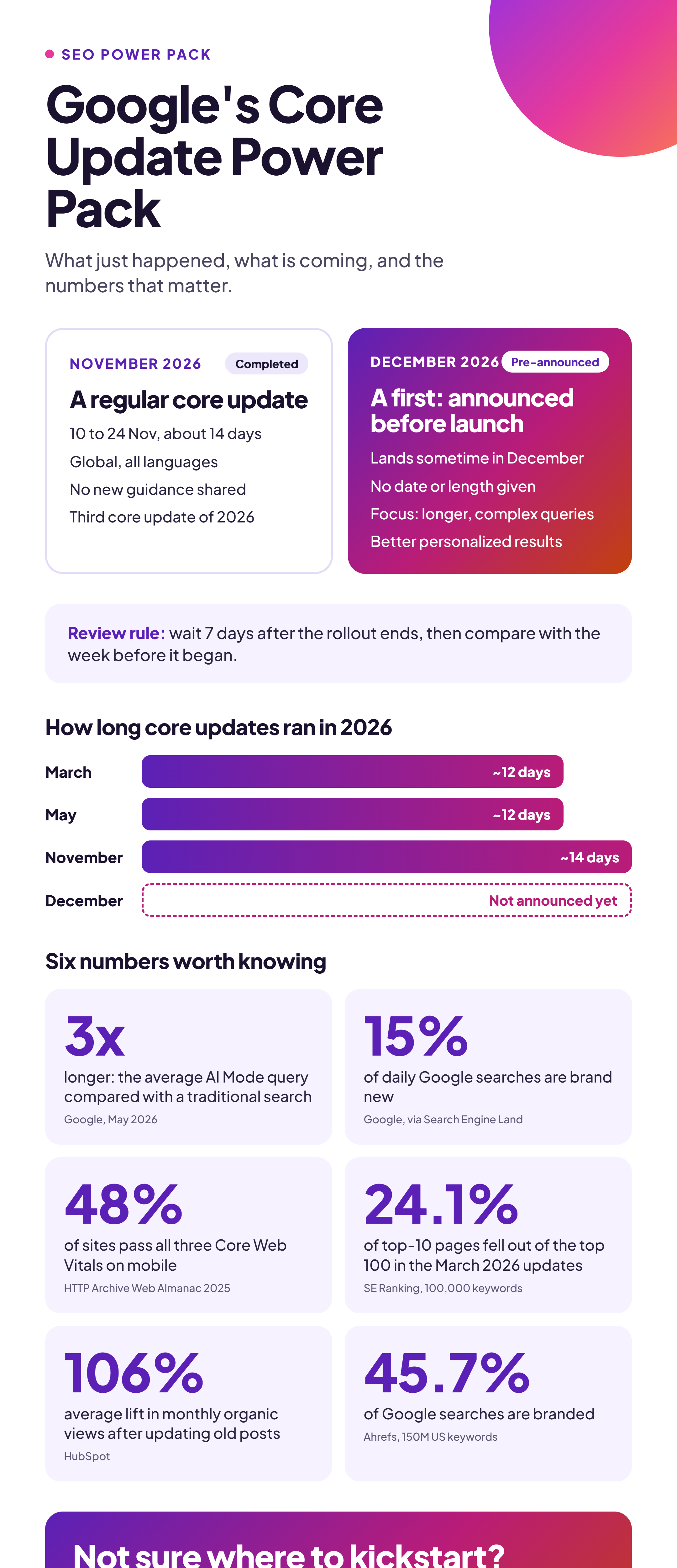
One more thing. Google says to wait at least a week after an update ends. Then compare that week with the week before it started. Keep that in your back pocket. You'll need it.
Prep 1: Get ready now
These take a couple of hours, if you do it manually. Do them before December starts.
If you do this from the Leadmetrics AI Marketing Platform, the workflow will fix it quickly, simply because we start with the spotting the gap and also pinpointing where your competitor is scoring better on the cards.
Trust us, this will be visual treat for you - this Christmas
Tip 1: Take a "before" snapshot today
Here's the thing. You can't prove what an update did if you don't know where you started.
So export your data now, connect your channels into Leadmetrics dashboard in one click!
Not after the rollout begins.
What to measure:
- Search Console gives you four numbers per page and query: clicks, impressions, click-through rate (CTR) and average position.
- Export the last 28 days. Save pages and queries separately.
What the research says:
Google advises waiting a week after an update finishes. Then compare that week with the week before the rollout started, as Search Engine Journal reports. A before-and-after window is also how Workshop Digital judged 273 content refreshes: 90 days before, 90 days after. It noted that Search Console only looks back 16 months, so some older changes had no clean "before" data. Save yours now.
Example: A travel blog exports 28 days of data on 1 December. When the update ends, it compares the same pages week against week.
Tip 2: List your top 20 money pages
Not every page matters equally. A handful bring the leads, sales or sign-ups. Know them by name. Check them first.
What to measure:
For each page, note clicks, conversions or leads, and the main queries it ranks for. Track how much of your total business it drives.
What the research says:
Google's own helpful-content guidance says to audit a traffic drop by asking which pages were hit hardest and for which types of searches. You can't do that without a list. The guidance is on Google Search Central.
Example: A SaaS site lists its pricing page, three comparison posts and its best how-to guide. Those get watched daily.
Tip 3: Pause big site changes
If you change ten things during a rollout, you won't know which one mattered. And rankings are already moving on their own. Keep the site steady.
What to measure:
Count how many significant changes go live between now and the end of the rollout. The goal is as close to zero as you can get.
What the research says:
SE Ranking tracked 100,000 keywords across 20 niches during the March 2026 updates. About 90.7% of top-10 URLs changed position. And 24.1% of top-10 pages fell out of the top 100. Caveat: it counted any shift, even one place, and the spam and core updates overlapped. Still, that's a lot of movement. Semrush also advises holding major changes until rankings settle.
Example: The redesign planned for mid-December moves to January.
Tip 4: Fix the boring technical stuff
Technical problems hurt you whether or not an update is running. They're also the easiest wins. So clear them before December.
What to measure:
Core Web Vitals: Largest Contentful Paint at 2.5 seconds or less, Cumulative Layout Shift at 0.1 or less, and Interaction to Next Paint at 200 milliseconds or less. Also check how many pages Search Console reports as not indexed.
What the research says:
The 2025 Web Almanac found only 48% of sites passed all three vitals on mobile and 56% on desktop. So passing puts you ahead of many sites. On speed, Google's Think with Google research with SOASTA found bounced mobile sessions loaded about 2.5 seconds slower than non-bounced ones. That data is from 2016, so treat it as direction, not a rule.
Example: Search Console shows 40 pages as "crawled, not indexed." You fix those before anything fancy.
Tip 5: Keep a change log
You'll forget what you changed. Everyone does. A simple log saves you hours later. Guess what? In the Leadmetrics dashboard, the tool seamlessly accounts for all the checks done round the clock. So, from audits to rectifications are executed from the tool. Keep your team stress free, as we have your back!!
What to measure:
Date, URL, what changed, and why. Add the page's clicks and position on the day of the change.
What the research says:
Workshop Digital measured each change over the 90 days before and after its date. Some older refreshes couldn't be measured, because Search Console's 16-month lookback left them without "before" data. Dated records make before-and-after proof possible.
Example: A simple sheet with three columns: "12 Dec, /pricing, added FAQ block."
Tip 6: Track 20 keywords daily
Watch the terms that make money. Ignore the noise from the rest. Daily checks show the shape of the rollout without drowning you. No worries. We have this sorted out ! Our Keyword Rank Tracker AI Tool is amongst our most client- voted feature to check out.
What to measure:
Average position and top-10 presence for 20 revenue keywords. Compare against your Search Console data weekly, the comparison is ready to check on the Leadmetrics Tracker too.
What the research says:
Most often, about nine in 10 top-10 URLs moved at least a little. So expect wobble. Semrush advises checking any sharp, odd movement in Search Console before you act on it.
Example: An agency tracks "seo agency for startups" and its 19 siblings, and checks them each morning.
Tip 7: Warn your boss or client early
Rankings wobble during a rollout. That's normal. But surprises feel like failures. So set expectations first. And yes, we have a business strategy expert tool that automatically alerts on what is wrong and what action to be taken. Pretty cool huh?
What to measure:
Not a metric this time. Agree on the review date. Pick one week after the rollout ends.
What the research says:
Rollouts vary. March and May 2026 took about 12 days each. November 2026 took about 14. Semrush also notes November 2024 ran nearly 24 days, and November 2023 almost 26. So the December timeline is a guess for now.
Example: "Google has a core update coming in December. We may see movement for two to three weeks. We'll review one week after it ends."
Prep 2: Write for long, complex questions
Google says December is about longer and more complex queries. So let's write like people actually search. Long. Messy. Specific. Where a tip has no hard study behind it, I say so.
Tip 8: Answer the big question in the first 100 words
Don't make people dig. Give the plain answer first. Then explain. It helps readers. It also makes your page easier to quote.
What to measure:
Track CTR, impressions and average position for question-style queries. Watch engagement time on the page too.
What the research says:
Google says the average AI Mode query is triple the length of a traditional one, per its May 2026 report. Longer questions reward direct answers. Search Engine Journal recommends putting the main conclusion in the first sentence of each section so AI systems can extract it. Note: that's an expert recommendation, not a Google rule. Workshop Digital also found that adding answers near the top was part of its strongest blog refreshes.
Example: For "how to check if a core update hit my site," open with the answer: compare the week after the rollout with the week before, in Search Console. Then walk through the steps.
Tip 9: Turn short keywords into full questions
People type full thoughts now. So match them. A two-word keyword hides what the person really wants.
What to measure:
In Search Console, filter queries with a custom regex for five or more words. On the Leadmetrics Dashboard, track their impressions and clicks over time. Count the unique queries each page earns.
What the research says:
Google has said for years that about 15% of its daily searches are brand new. Search Engine Land reported Google first made that claim in 2013 and restated it later. That's a huge long tail you can't predict with keyword lists. Add Google's finding that AI Mode queries run about three times longer, and writing for full questions makes sense.
Example: Instead of "crm software," write for "which CRM is best for a five-person agency that sells on WhatsApp?"
Tip 10: Cover the follow-up question too
One question usually leads to the next. Answer both on the same page. Then the reader doesn't need to go back to Google.
What to measure:
Count distinct queries each page ranks for. Watch impressions per page grow as you add related answers.
What the research says:
The support is Google's own self-check in its helpful content guidance. It asks whether someone reading your page would feel they've learned enough to reach their goal. Follow-up answers are how you pass that test.
Example: A post on "how to start a podcast" also covers "how much does it cost?" and "do I need a studio?"
Tip 11: Use headings that sound like real questions
Headings are signposts. Make them sound human. People scan them first, and AI systems use them to find answers.
What to measure:
Compare CTR and position for pages before and after you rewrite headings. Use the same 90-day window each time.
What the research says:
Workshop Digital lists clearer headings among the changes in its best-performing blog refreshes. It looked at 41 blog pages and saw sessions rise 545.1% over 90 days against a 9.1% fall for untouched blog pages. Caveat: several things changed at once, and the overall sample started from a small traffic base. So don't credit headings alone.
Example: Swap "Pricing overview" for "How much does it really cost per month?"
Tip 12: Say "it depends" and then explain
Complex questions rarely have one answer. Be honest about it. It builds trust.
What to measure:
Look at returning visitors, engagement time and shares on these pages. Those are signals that people found it useful.
What the research says:
Again, no study isolates this one. But Google's helpful content guidance asks whether your content gives original analysis and whether a reader would bookmark, share or recommend it. Honest trade-offs do that. Generic "best for everyone" claims don't.
Example: "Pick Plan A if you have under 10 users. Pick Plan B if you need reporting."
Tip 13: Show real experience
First-hand detail beats generic advice. Say what you did. Say what happened. Show the proof.
What to measure:
Check what share of your top pages include original photos, screenshots, data or a named author with credentials. Aim to raise it page by page.
What the research says:
In December 2022, Google added Experience to its E-A-T quality framework, making it E-E-A-T. See the Search Central announcement. Its current guidance also asks whether your content shows first-hand expertise and whether it's clear who wrote it and why they're qualified. Those are Google's own questions, so answer them on the page.
Example: Skip "tips for faster sites." Write "We compressed our hero images and the page loaded faster. Here's the before and after."
Tip 14: Make long answers easy to scan
Short paragraphs. A list here. A table there. Readers skim. Help them.
What to measure:
Track engagement time and scroll depth before and after you reformat. Watch exits on your longest pages.
What the research says:
Nielsen Norman Group's analysis found users have time to read at most 28% of a page's words, and likely closer to 20%. It also estimated they read about 18% of any text you add. The study covered 45,237 page views from 25 users, and the data was collected in 2005, so it's old. Still, it's one of the most cited scanning studies. Read it at NN/g.
Example: A comparison of three tools becomes a small table with price, best-for and one caveat.
Prep 3: Protect, measure and stay calm
The last seven are about the long game. Plus how to behave once the rollout starts.
Tip 15: Build a brand people look for
Google says December will improve results for people who have personalization on. My take: brands people already know and return to may have an edge. That's my reading, not something Google has confirmed. Still, brand is worth building either way.
What to measure:
In Search Console, filter queries that contain your brand name. Track their clicks and impressions. Also watch direct visits, returning users and newsletter sign-ups.
What the research says:
Ahrefs analyzed about 150 million US keywords and found 45.7% of Google searches by volume are branded. In a separate study of 75,000 brands, branded web mentions had the strongest correlation (0.664) with brand visibility in AI Overviews. Branded search volume came in at 0.392. Caveats: that's correlation, not cause, and it's about AI Overviews, not core rankings.
Example: A newsletter, a community or a podcast that brings people back to your site by name.
Tip 16: One page, one clear job
If a page tries to do five things, it does none well. Match each page to one main intent. It's easier for Google to understand. It's easier for people too.
What to measure:
List the queries each page ranks for. Look for cases where two of your URLs compete for the same query. That's a sign of overlap.
What the research says:
Workshop Digital found that its strongest blog refreshes tightened topical focus and consolidated overlapping ideas. For core and service pages, small edits that clarified the page's message went with a 312.2% rise in sessions, against a 33.4% fall for untouched pages. Caveat: the overall sample started from a small traffic base, so read the percentages with care.
Example: Split a page that targets both "SEO tips" and "SEO tools" into two focused pages.
Tip 17: Refresh your old winners
Don't rewrite from scratch. Improve what already works. Keep the URL. Update what's stale, add what's missing.
What to measure:
Compare sessions, clicks, impressions, CTR and position for 90 days before and 90 days after each refresh. Include a few untouched pages as a control.
What the research says:
HubSpot reported that updating and republishing old posts raised monthly organic views on those posts by an average of 106% and tripled their monthly leads. And Workshop Digital measured 95 refreshed pages: organic sessions rose from 610 to 3,341 (+447.7%) while untouched pages fell 20.2%. Caveats: Workshop's base was small, and HubSpot is one large blog. Its best refreshes were better, not necessarily longer.
Example: Update the stats in a two-year-old guide, add a short FAQ and fix broken links.
Tip 18: Merge or remove thin pages
Five weak pages on the same topic don't beat one strong one. Combine them. Then redirect the old URLs to the new one.
What to measure:
Find pages with zero clicks in the last 12 months. Find groups of URLs that rank for the same query. Those are your merge candidates.
What the research says:
Two things support the idea. Workshop Digital lists consolidating overlapping ideas among its best refreshes. And Google's helpful content guidance names content made mainly to attract search visits, and mass-produced content across many topics, as warning signs.
Example: Three 300-word posts on meta descriptions become one complete guide. The old URLs 301 to the new one.
Tip 19: Strengthen internal links
Point your best pages at each other. Use descriptive anchor text. It helps people. It helps crawlers find and understand pages too.
What to measure:
Count internal links pointing at each key page. Find orphan pages that have none. Check how varied your anchor text is.
What the research says:
Zyppy studied 23 million internal links across 1,800 sites and about 520,000 URLs. Pages with 0 to 4 internal links averaged about 2 Google clicks. Pages with 40 to 44 got roughly four times that. Gains faded past about 45 to 50 links. Varied anchor text had the strongest relationship with traffic. Caveat: it's correlation, so treat it as direction, not proof.
Example: Five related blog posts link to your main pricing guide with the anchor "how SEO pricing works."
Tip 20: Don't panic-edit during the rollout
Rankings move around while an update rolls out. Rewriting everything on day three just muddies the data. Wait. Then act on evidence. Here is where our Leadmetrics Audit AI Tool pinpoints systematically in advance on what needs an eagle eye and yes, solutions too.
What to measure:
After the rollout ends, wait a full week. Then compare that week with the week before the rollout began. Look at pages and queries, not just the total.
What the research says:
Google hasn't tied core updates to specific recovery actions, as Coalition Technologies put it. Recovery can be slow. Glenn Gabe tracked about 400 sites hit hard by Google's September 2023 helpful content update. By early November 2024, about 22% (88 sites) were up 20% or more, while most saw no lift. About 13% fell further. See Search Engine Roundtable. Caveat: that was a different update and a sample, not every affected site. The lesson holds: build durable quality, not quick fixes.
Example: Your traffic dips on day three. Instead of rewriting every title, you note it in the change log and check again after the rollout ends.
Tip 21: Use the new feedback option
Google now lets site owners send feedback on announced ranking updates through Search Console, per Search Engine Journal. It also added an appeal route for UK users' sites that were manually removed. It's not a guarantee. But it's a voice.
What to measure:
Log each submission: date, update name, URL, query, and what you expected to see.
What the research says:
It's too new for data. Nobody can yet show how much feedback changes outcomes. So treat it as a way to report clear problems, not a recovery plan.
Example: After the rollout, a clearly better page loses to a thin one. You report the query and both URLs.
Final thoughts
Here's the simple truth. You can't predict the December update. But you can be ready for it.
Snapshot your data. Fix the basics. Write for real, long, messy questions. Then wait, measure and act on evidence, not on a bad Tuesday.
Google gave us a heads-up for the first time. Use it.
Want a second pair of eyes on your site before December? Run a quick audit this week, while the window is still open.
Sources
Facts about the November and December updates come from these pages.
- Google Search Status Dashboard: November 2026 core update
- Google Search Status Dashboard: ranking update history
- Search Engine Land: Google preannounced the December 2026 core update
- Search Engine Roundtable: December 2026 core update preannounced
- Search Engine Journal: Google announces December 2026 core update
- Search Engine Journal: advance notice and feedback documentation
- Search Engine Land: November 2026 core update rolling out
- Search Engine Roundtable: November 2026 core update
- Semrush: November 2026 core update, what marketers should know
- Coalition Technologies: November 2026 core update complete
- DEV Community: December 2026 core update and complex queries
- Google: How AI Mode is changing the way people search in the US (May 2026)
- Search Engine Journal: AI Mode queries are 3x longer
- Search Engine Land: Google reaffirms 15% of searches are new
- HTTP Archive Web Almanac 2025: Performance
- Think with Google: Mobile page speed
- Nielsen Norman Group: How little do users read?
- HubSpot: Optimizing the past
- Workshop Digital: 273 content refreshes analyzed
- SE Ranking: March 2026 core update volatility
- Zyppy: 23 million internal links study
- Google Search Central: Creating helpful, reliable, people-first content
- Google Search Central: E-A-T gets an extra E for Experience (Dec 2022)
- Search Engine Roundtable: helpful content update recovery data
- Ahrefs: Almost half of Google searches are branded
- Ahrefs: AI Overview brand visibility study
Share on Social Media
Frequently Asked Questions
Is the December update live yet?

My traffic fell after the November update. Am I penalized?
How long will the December update take?
When should I check my numbers?
Is there a quick fix if I lose rankings?
What's the difference between a core update and a spam update?
Do I need special schema or a word count for complex queries?
What does "personalization" mean for my rankings?
Should I republish my posts on Medium or share them on Reddit?
Does this affect AI Overviews and AI Mode?